

Free Download AI Text to Speech 1.0.15 + Portable | 686 / 597 MB
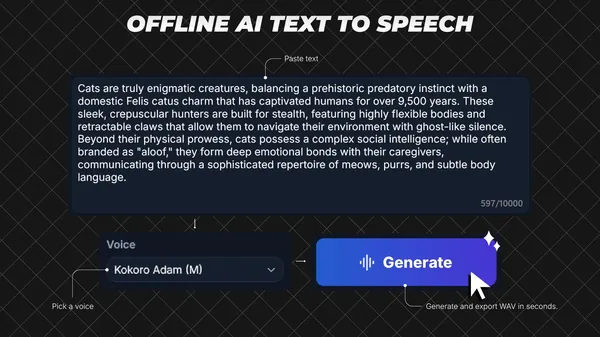
AI Text to Speech is an AI-powered desktop application for Windows that converts written text into natural-sounding speech using locally processed voice models. Designed for offline use, it enables users to generate voice recordings without relying on cloud services or API keys, making it suitable for content creation, education, accessibility, and professional narration tasks.
This release includes both the standard and Portable editions, allowing users to choose between a traditional installation or a portable deployment. The application provides a straightforward workflow for generating speech, previewing audio, and exporting high-quality WAV files for further use.
With support for multiple AI speech models, adjustable playback speed, and configurable hardware acceleration, AI Text to Speech offers a flexible environment for creating voice output directly on a Windows computer.
Software OverviewAI Text to Speech is built for users who need an efficient offline text-to-speech workflow. After entering text, users can choose a supported AI model and voice, generate speech locally, preview the results, and export audio files for presentations, videos, podcasts, tutorials, or other projects.
The application includes settings for generation preferences, export behavior, hardware selection, and interface customization. Automatic text chunking helps process longer scripts while maintaining stable voice generation across extended passages.
Key Features
- Includes both the standard and Portable editions.
- Offline AI text-to-speech generation without cloud API keys.
- Supports Kokoro-82M and KittenTTS voice models.
- Processes up to 10,000 characters in a single generation.
- Automatically splits long scripts into manageable segments.
- Adjustable speech speed from 0.50x to 1.50x.
- Built-in audio preview with playback controls and history.
- Supports manual and automatic WAV file export.
- Configurable inference mode with Auto, CPU, or GPU options.
- Dark and light interface themes.
- Integrated settings, logs, notifications, and license references.
The inclusion of both the standard and Portable editions offers flexibility for different deployment preferences while maintaining the same core functionality.
System RequirementsOS: Windows 10 version 17763.0 or higher
Memory: 4 GB (Minimum), 8 GB (Recommended)
Processor: 64-bit dual-core 2.0 GHz (Minimum), 64-bit quad-core 3.0 GHz (Recommended)
Frequently Asked Questions
What is AI Text to Speech used for?It converts written text into spoken audio using locally processed AI voice models.
Does the software require an internet connection?No. The application is designed to perform speech generation locally without requiring cloud API keys.
Which audio format can be exported?The application exports generated speech as WAV audio files.
Home Page
Code:
https://apps.microsoft.com/detail/9np9xhh0c5pv- Software Name: AI Text to Speech
- Version: 1.0.15
- Languages: English
- License type: Full Version + Portable
- File Size: 686 / 597 MB

View hidden content is available for registered users!
Links are Interchangeable - No Password - Single Extraction



